References
In some cases, the result produced by one stage needs to be consumed by multiple stages down the processing chain. Inlining the same stage definition at many places would lead to unnecessary duplication of code. Stage references solve this problem.
A reference is a special kind of stage that refers to the result of a stage that is already defined in the request. References can be explicit or automatic.
Explicit references
The initial label extraction example relied on definition inlining to connect two stages. Let's rewrite the example using explicit references:
{
  "stages": {
    "documents": {
      "type": "documents:byQuery",
      "query": {
        "type": "query:string",
        "query": "photon"
      },
      "limit": 1000
    },
    "labels": {
      "type": "labels:fromDocuments",
      "documents": {
        "type": "documents:reference",
        "use": "documents"
      }
    }
  }
}
Label extraction request with nested stages replaced with explicit references.
The differences between the reference- and inline-based version are the following:
-
The document search stage is now explicitly defined in the
stagesobject under thedocumentsidentifier. -
The
labels:fromDocumentsstage references thedocumentsstage using thedocuments:referencestage type.
Let's further extend our request by adding the computation of term frequency, document frequency and probability ratio scores for each label:
{
  "stages": {
    "documents": {
      "type": "documents:byQuery",
      "query": {
        "type": "query:string",
        "query": "photon"
      },
      "limit": 500
    },
    "labels": {
      "type": "labels:fromDocuments",
      "documents": {
        "type": "documents:reference",
        "use": "documents"
      }
    },
    "tf": {
      "type": "labels:scored",
      "scorer": {
        "type": "labelScorer:tf"
      },
      "labels": {
        "type": "labels:reference",
        "use": "labels"
      }
    },
    "df": {
      "type": "labels:scored",
      "scorer": {
        "type": "labelScorer:df"
      },
      "labels": {
        "type": "labels:reference",
        "use": "labels"
      }
    },
    "pr": {
      "type": "labels:scored",
      "scorer": {
        "type": "labelScorer:probabilityRatio"
      },
      "labels": {
        "type": "labels:reference",
        "use": "labels"
      }
    }
  }
}
Fetching additional statistics for a list of labels: term frequency, label frequency and probability ratio.
The request adds three more stages, tf, df and pr, of type
labels:scored, all of which reference the labels stage.
When you execute the request, you should see additional entries in the
result object for the statistics we just added. If you switch to the labels tab, the
table should now display additional columns with label statistics, as in the screenshot below.
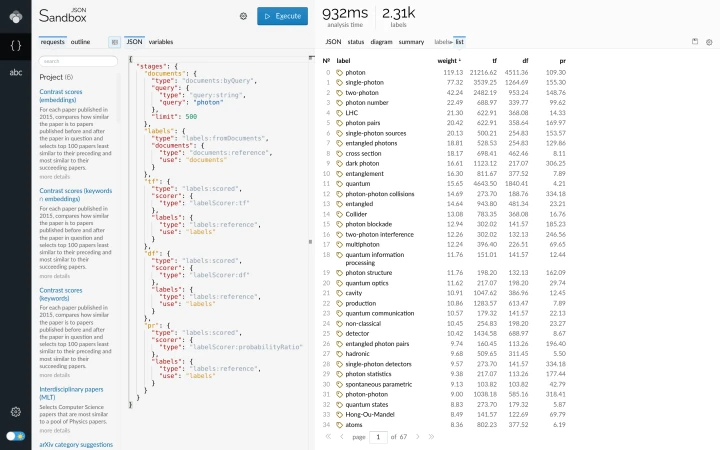
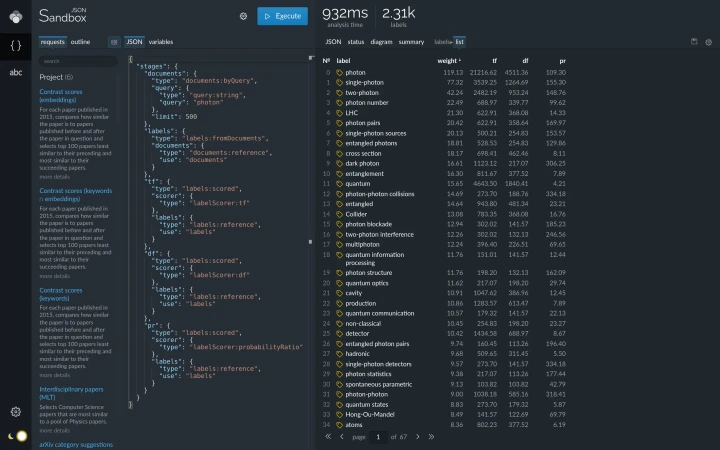
A request that computes additional statistics for a list of labels, along with a tabular presentation of the labels and statistics.
As the number of interconnected stages in the request grows, you may want to use the diagram tab to get a visual overview of the connections between the stages in your request. The screenshot below shows the diagram for our label statistics extraction request.

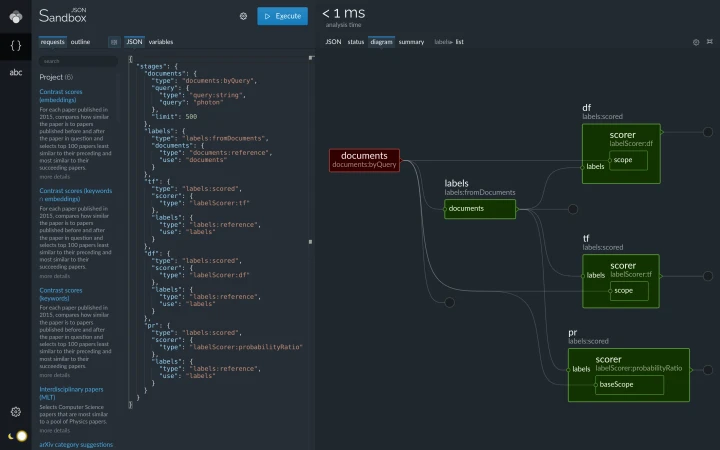
Diagram view of the label statistics computation request.
Each box in the diagram corresponds to one stage declared in the
stages object. Links between the boxes represent the references between stages. In case of our
request, the labels stage uses the results of the documents stage. The
labels stage then feeds its output to the df, tf and
pr stages.
Auto references
If you look carefully at the diagram
of the label statistics fetching request, you will see that the
documents stage is connected to the df, tf and pr stages even
though the request does not set up the references explicitly. The links arise as a result of auto references.
An auto reference does not define its target explicitly, but instead resolves automatically if the
stages object contains exactly one stage of a compatible type. If we get back to the simple two-stage
explicit references example, we can replace the explicit reference with an
automatic one:
{
  "stages": {
    "documents": {
      "type": "documents:byQuery",
      "query": {
        "type": "query:string",
        "query": "photon"
      },
      "limit": 1000
    },
    "labels": {
      "type": "labels:fromDocuments",
      "documents": {
        "type": "documents:reference",
        "auto": true
      }
    }
  }
}
Label extraction request with explicit reference replaced with an auto reference.
The request contains only one stage of type documents, so Lingo4G can safely resolve the auto
reference to target that stage.
You can further simplify the request by completely removing the auto reference part:
{
  "stages": {
    "documents": {
      "type": "documents:byQuery",
      "query": {
        "type": "query:string",
        "query": "photon"
      },
      "limit": 1000
    },
    "labels": {
      "type": "labels:fromDocuments"
    }
  }
}
Label extraction request with auto reference declaration removed.
The above request also works as expected because the default value of the
documents property of the
labels:fromDocuments
stage is an auto reference, just like the one we removed.
A great majority of stage-typed properties default to an auto reference. Therefore, if your request contains only one stage of each type, you can safely omit specifying references explicitly. The diagram view of the request will still show the connections established by implicit auto references.
If a request does not contain a stage of the requested type, or it contains more than one stage of a matching type, Lingo4G throws an error indicating that it cannot resolve such an auto reference. In such cases, you must use an explicit reference.