Labels layer API
This reference describes the labels layer API.
The labels layer draws short fragments of text at the specified 2d coordinates. You can define the color and opacity of each label. Additionally, you can draw boxes around specific labels:
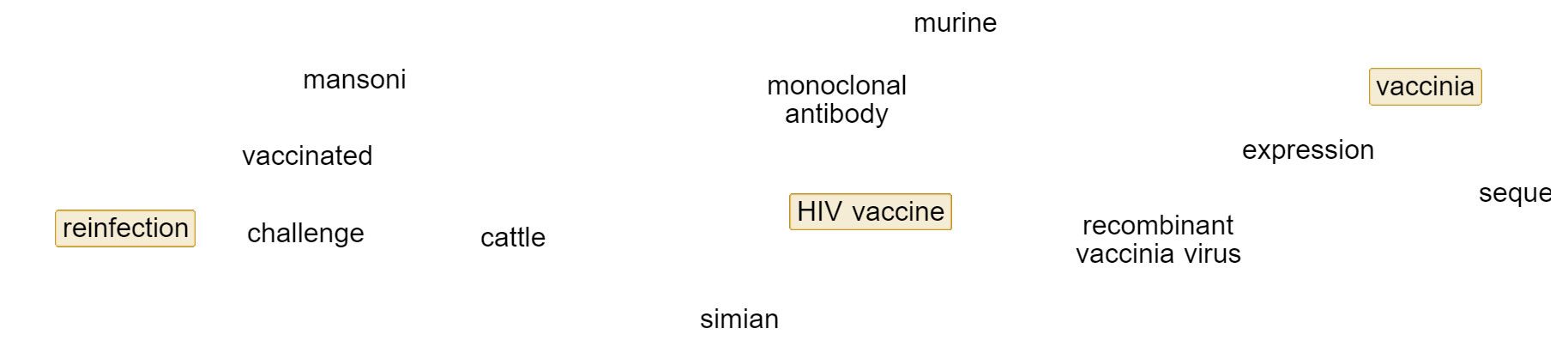
You can create a labels layer using the following code:
const labels = DotAtlas.createLayer({
  points: [],
  type: "label",
  labelFontSize: 16,
  labelColor: "rgb(0, 0, 0)"
});
Before drawing, the layer pre-renders text into a GPU texture called an atlas — a shared sheet of text sprites. To draw a label, dotAtlas looks up the corresponding sprites in the atlas and stamps them at the point's position on screen. Two options control how those sprites are organized and how they are rendered:
labelAtlas-
What pieces go into the atlas, fixed at layer construction.
word- Each unique word is rendered into its own sprite with full native shaping, including kerning and ligatures. Drawing a label stamps one sprite per word. The atlas grows with the number of distinct words across all labels.
glyph- Each unique character is rendered once into its own sprite. Drawing a label stamps the characters one by one. The atlas grows with the alphabet size rather than the label count, scaling to very large label sets – at the cost of unkerned character spacing.
auto(default)-
Prefers
wordfor its higher rendering quality, falling back toglyphwhen there are too many distinct words to fit the word atlas. Resolved once at construction; readinglabelAtlasback returns the chosen engine.
labelRendering-
How the atlas sprites are drawn on screen.
raster-
Draws the sprite pixels directly to the visualization, crisp at
labelFontSize, softer when scaled up or down. sdf-
The atlas sprites store distances to glyph outlines. dotAtlas uses these to reconstruct
crisp edges at draw time. While negligibly softer than
rasterin general, stays noticeably sharper when scaled up, though quality degrades at large magnifications. Also supports per-label outlines.
The two settings combine to four rendering modes:
-
word+raster— what the defaults give unless there are too many distinct words for the word atlas. Full native shaping and correct kerning; crisp at the configuredlabelFontSize, softening when scaled up. Good fit for typical map label sets of up to a few thousand distinct labels. -
word+sdf— full native shaping and correct kerning, crisp at any size, with outline support. Atlas still grows with the distinct word count; suitable for moderate-sized label sets that need differently sized labels in the same visualization or per-label outlines. -
glyph+raster— scales to very large label counts. Crisp at the configuredlabelFontSize, softening when scaled up. No kerning or ligatures. -
glyph+sdf— scales to very large label counts and supports per-label outlines. Use this mode for large datasets that need crisply scaledlabelSizevariation or per-label outlines. No kerning or ligatures.
Some options only apply in certain modes and are accepted but ignored otherwise. See the reference documentation for a specific option to check if it is available in the specific atlas and rendering mode.
Point properties
label
The text drawn for this point. Points without a label are not rendered by
the layer. The string is shaped according to the layer-wide font properties
(labelFontFamily,
labelFontSize, and the related
labelFont* options).
labelColor
The color of the label.
If the color is not provided for a point, the layer-wide
labelColor is used.
labelOpacity
The opacity of the label. If opacity is not provided for a point,
the layer-wide labelOpacity is used.
labelPriority
Controls the display of the labels at various zoom levels.
dotAtlas draws only those labels that do not overlap any other labels. This means that at a certain zoom level only a limited number of labels will show on the screen. As the zoom level increases, more labels located in the zoomed area will show.
To control which labels show first, set the labelPriority of the point. If you
provide label priorities, dotAtlas displays labels in the decreasing order of priority.
labelSize
Per-label size multiplier applied on top of the layer-wide
labelFontSize, 1.0 by default.
A label with labelSize: 2.0 will be rendered roughly twice as tall as a
label with labelSize: 1.0.
The value is clamped to the
[labelMinSizeScale,
        labelMaxSizeScale]
range configured on the
layer. Both default to 1.0, so per-point labelSize has no
visible effect until you widen that range. Larger labels also occupy proportionally larger collision boxes, so they will
suppress more nearby smaller labels at low zoom levels. Under
raster rendering the pre-rendered sprite is
scaled, so oversized labels will appear softer; under
sdf rendering edges stay crisp at any
size.
labelOutlineColor
Color of the outline drawn around
the glyphs of this label. If not provided, the layer-wide
labelOutlineColor is used.
Only visible when labelRendering is
sdf.
labelOutlineWidth
Width of the outline drawn around the glyphs of this label, in CSS pixels. If not
provided, the layer-wide
labelOutlineWidth is used. Set to
0 to disable the outline for this label.
Only visible when labelRendering is
sdf.
labelBoxColor
Color of the box to draw around the
label. If not provided, the layer-wide labelBoxColor
is assumed.
labelBoxOpacity
Opacity of the box to draw around the label. If not provided, the layer-wide
labelBoxOpacity will be used.
Layer properties
labelAtlas
Atlas granularity, set once when the layer is created and fixed afterwards.
auto- Default. Picks
wordwhen every unique word fits the word atlas, otherwiseglyph. glyph- Rasterizes each character once and scales to very large label counts, at the cost of unkerned glyph advances.
word- Rasterizes whole words with full native shaping.
Because the atlas selects the render context bound at construction, this property is
read-only afterwards: assigning to it on an existing layer is silently ignored, and reading
it back always returns the resolved concrete engine (word or
glyph), never auto. To switch atlas, re-create the layer.
labelRendering
How the atlas is drawn. Can be changed at any time.
raster-
Default, for either atlas. Samples the pre-rendered sprite pixels directly –
crisp at the configured
labelFontSize, softening when scaled up. sdf- Reconstructs crisp edges at any size and enables outlines.
labelCollisionModel
How labels are packed when computing visibility.
labelFontSize
The font size to use to draw all labels on this layer, 16 by default.
Only numeric values in pixels are accepted; CSS length specifications such as
1em are not supported.
Per-point labelSize values are
applied as a multiplier on top of labelFontSize.
labelFontFamily
The font family to use to draw all labels on this layer, sans-serif by default.
This property accepts CSS-compliant font family specification.
labelFontWeight
The font weight to use to draw all labels on this layer, normal by default.
This property accepts CSS-compliant font weight definitions, such as bold
or 300.
labelFontStyle
The font style to use to draw all labels on this layer, normal by default.
This property accepts CSS-compliant font style definitions, such as italic.
labelFontVariant
The font variant to use to draw all labels on this layer, normal by default.
This property accepts CSS-compliant font variant definitions, such as
small-caps.
labelColor
Layer-wide label color,
rgba(0, 0, 0, 1.0) by default.
Labels for which the point-specific labelColor
was not provided will be drawn in the color defined by this property.
labelOpacity
Layer-wide label opacity, 1.0 by default.
Labels for which the point-specific labelOpacity
was not provided will be drawn with the opacity defined by this property.
labelMinSizeScale
Lower clamp for the per-point
labelSize multiplier,
1.0 by default. Per-point labelSize values smaller than this
will be rendered as if they were equal to labelMinSizeScale.
labelMaxSizeScale
Upper clamp for the per-point
labelSize multiplier,
1.0 by default. Per-point labelSize values larger than this
will be rendered as if they were equal to labelMaxSizeScale.
The clamp lets you derive labelSize directly from a domain quantity (such
as a score) without a few outliers dominating the visualization.
labelOutlineColor
Layer-wide outline color drawn
around the glyphs of all labels on this layer,
rgba(255, 255, 255, 0.9) by default.
Labels for which the point-specific
labelOutlineColor
was not provided will use the outline color defined by this property. The outline is
only visible when
labelOutlineWidth is greater than zero.
Only visible when labelRendering is
sdf.
labelOutlineWidth
Layer-wide outline width drawn around the glyphs of all labels on this layer, in CSS
pixels, 0 by default (no outline).
Labels for which the point-specific
labelOutlineWidth was
not provided will use the outline width defined by this property. Outlines remain
screen-fixed regardless of the per-label
labelSize, so they look uniform
across labels of different sizes.
Outlines can only grow to a fairly small limit. The limit is a few
pixels on the glyph atlas, and smaller still on the
word atlas.
Only applies when labelRendering is
sdf.
labelBoxColor
Layer-wide label box color,
hsla(40, 75%, 80%, 0.5) by default.
Labels for which the point-specific labelBoxColor
was not provided will use the box color defined in this property.
labelBoxOpacity
Layer-wide label box opacity, 0.0 by default.
Labels for which the point-specific labelBoxOpacity
was not provided will be drawn with the box opacity defined by this property. As a result,
if you set this property to a non-zero value, all labels for which label box opacity
was not overridden will be drawn inside boxes.
labelShadowColor
Color of the drop shadow to draw under all labels on this layer, transparent by default.
Drop shadows are a good way to lift labels off busy or dark backgrounds. The shadow
is sampled from the shared label-mask, so it follows the visible glyph silhouette
rather than the glyph bounding box. The shadow is only visible when
labelShadowSize is greater than zero.
labelShadowSize
Strength of the drop shadow under all labels on this layer, 0 by default
(no shadow). Larger values produce a wider and more opaque shadow.
labelAtlasQuality
SDF glyph atlas quality preset, standard by default. Picks the source
raster font size and the SDF reach radius used to build the glyph atlas. Higher tiers
produce visibly crisper labels when zoomed in or scaled up via
labelSize, at the cost of fitting
fewer unique glyphs in the atlas.
Accepted values:
low- Smaller atlas footprint; best for dashboards with many small labels and no aggressive zoom-in.
standard- Default. A good balance for ASCII at typical device pixel ratios.
high-
Noticeably crisper edges when zoomed in or with large
labelSizevalues. ultra- For Latin-only maps with heavy zoom-in or very large labels. Multilingual label sets (CJK) may overflow the atlas at this tier.
Higher presets fit fewer glyphs in the atlas, so a large alphabet – or a
high preset at a high device pixel ratio – can overflow it. Labels that use a
glyph which did not fit are dropped whole rather than drawn with missing characters,
and the count is reported by
droppedLabelCount. Lower the preset
(or reduce the alphabet) if labels go missing.
Changing this property rebuilds the glyph atlas, so pick a preset at layer construction and avoid changing it per frame.
Applies only to the glyph atlas with
sdf rendering; the raster glyph atlas is
rendered at labelFontSize and ignores this property.
labelEdgeSharpness
Scales the SDF antialiasing band width, 4.0 by default. Higher values
produce crisper glyph edges; lower values soften the antialiasing band, which can read
better at very small sizes.
Only applies when labelRendering is
sdf.
labelEdgeThinning
Thins glyphs by fading their antialiased rim toward transparent, 0.75
by default. Higher values produce thinner strokes, up to 1.0;
0 disables thinning.
Useful for light fonts that appear overly bold at small sizes.
Only applies when labelRendering is
sdf.
labelMaskExpansion
Controls how far the label mask is fattened past the label edge, in source-raster
pixels, 1.0 by default. Increase it to widen the area where markers fade
out behind labels and the shadow cast by
labelShadowSize.
Only applies when labelRendering is
sdf.
labelDensity
Divisor of the spacing reserved around each label for collision, 1.0
by default. Values above 1.0 tighten the spacing so more labels fit at a
given zoom level; values below 1.0 widen it for more breathing room
between labels. Changing this property triggers a full visibility recomputation.
maxScaleForLabelVisibilityScales
Maximum zoom scale considered when precomputing per-label visibility thresholds,
Infinity by default.
At larger label counts the visibility computation runs across many zoom steps and
becomes the dominant cost of setting points. Capping this value
(for example to 64 or 128) reduces the number of zoom steps
evaluated. The trade-off is that labels which would only be revealed beyond the cap
stay hidden no matter how far the view is zoomed in, so set it past the deepest zoom
you expect to use.
maxSyncScaleForLabelVisibilityScales
Maximum zoom scale computed synchronously before the first frame, with the remainder filled in on idle frames. Defaults to one double-click worth of zoom from the base view.
Raising this value (up to Infinity for a fully synchronous sweep) ensures
more zoom levels are pre-computed before the first paint, at the cost of a longer
initial blocking pause. Lowering it reduces first-paint latency but may cause labels
to pop in when zooming beyond the precomputed range before the idle sweep catches up.
The current view is always covered regardless of this setting.
droppedLabelCount
Read-only. The number of labels that could not be rendered in the most recent layout
because the atlas overflowed; 0 when everything fits.
Both atlases have a finite capacity. The
word atlas overflows when there are too many
distinct words for its sprite sheet; the
glyph atlas overflows when the alphabet is too
large for the glyph sheet (most likely at a high
labelAtlasQuality preset or device pixel
ratio). In both cases the affected labels are dropped whole rather than drawn with
missing pieces.
Read it after a redraw to detect an overflowing layer — for example to fall back
to a smaller labelAtlasQuality, or to rely
on labelAtlas auto, which picks the
glyph atlas when the word atlas would drop labels.
Methods
state(point)
Returns layout-derived state for a single point as an object with one field, labelVisible
— true when the label is being drawn at the current zoom level, false
when it was suppressed by a higher-priority neighbor (see
labelPriority). Read it after a
redraw, for example to drive hit-testing or a hover affordance only for visible labels.